

Welcome Back!
In the previous blog we discussed about MAC learning and East-West packet walk in case of stretched network to 2 different physical locations, using NSX Federation.
Today we are going to discuss about North-South packet walk & decision factors which effects routing.
In case of NSX Federation, North-south traffic flow depends on multiple design factors and can be categorized in to 2 major design options.
- Routing Option
- Availability Option
| Routing Option | This option refers to the location preference. |
| All Primary | This option is available for T0 without services, N-S traffic is handled via local edge nodes. |
| Primary/Secondary | This option is available for T0 & T1 with services/SR & DR, N-S traffic is handled via Primary site’s active edge nodes. |
| Availability Option | This option refers to HA option with in T0/T1 , this is the usual HA option which we know for T0 & T1 for single site. |
| Active-Active | This option is available for T0 without services, N-S traffic is sent across all Edge nodes with in location which are part of T0. Each edge nodes forwards the packet locally to the fabric. |
| Active-Standby | This option is available for T0 & T1 with Services, N-S traffic is sent to Active Edge nodes which are hosting T0 & T1. Each edge nodes forwards the packet locally to the fabric. |
With above Routing & Availability options we get below use-cases.
| S. No. | T0 | Location | Remarks |
| 1 | Active-Standby | Primary-Secondary | A-S | Pri-Sec |
| 2 | Active-Active | Primary-Secondary | A-A | Pri-Sec |
| 3 | Active-Active | All Primary | A-A | Pri-Pri |
| 4 | Active-Standby | All Primary | Not Supported |
Lets discusses above use cases one by one.
- T0 Active-Standby | Location – Primary-Secondary – is the mode that offers the maximum of services on the Tier0. In this mode the Tier-0 can host central services, such as Gateway Firewalling, NAT, DHCP.
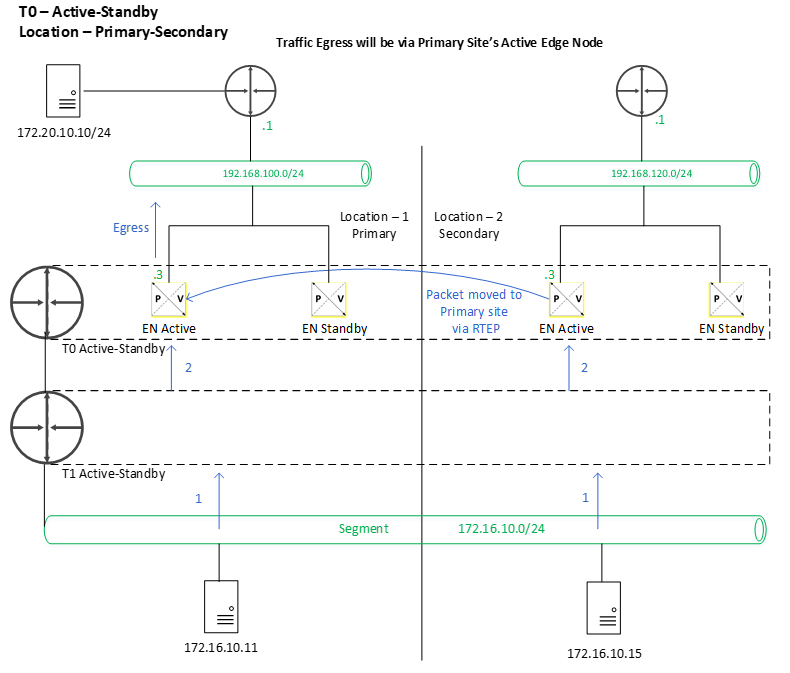
Lets configure above topology from global manager UI.
HA mode – Active-Standby , Site-A-LM – Primary , Site-B-LM – Secondary.


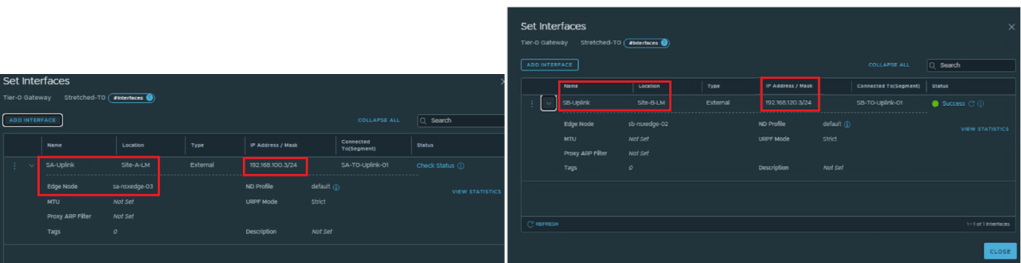
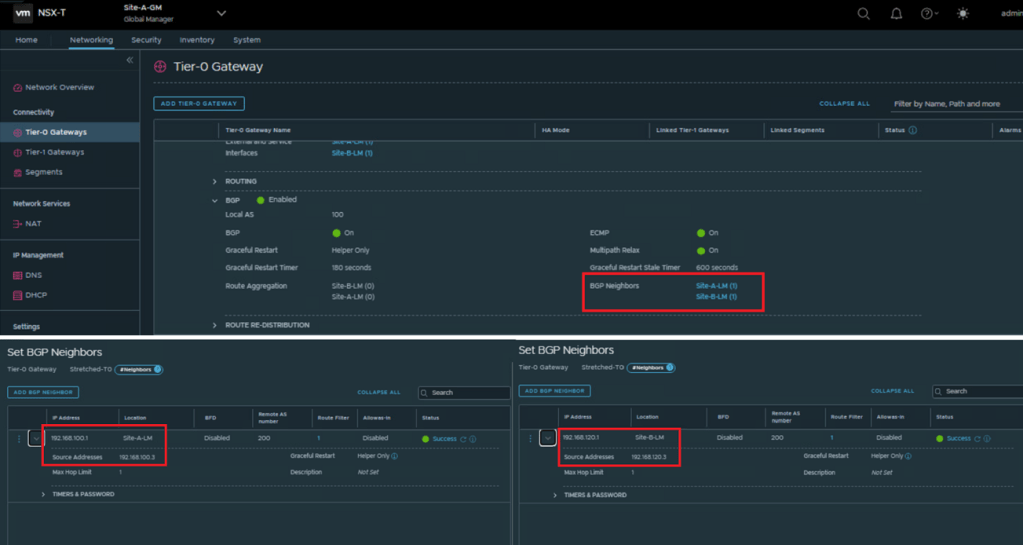
Configure BGP neighbors as needed, refer above topology diagram for better understanding of IP assignments.
Connect Stretched T1 to Stretched T0.
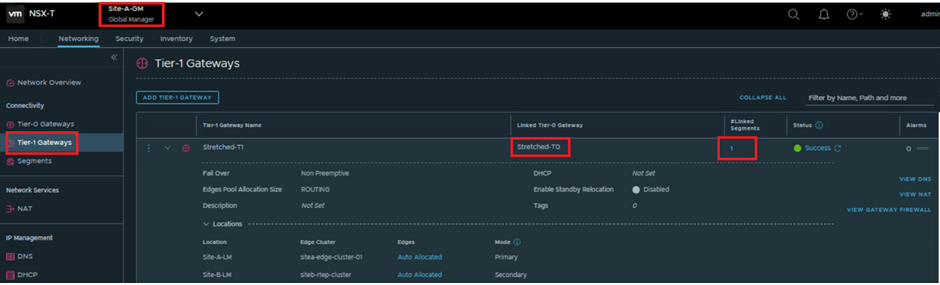
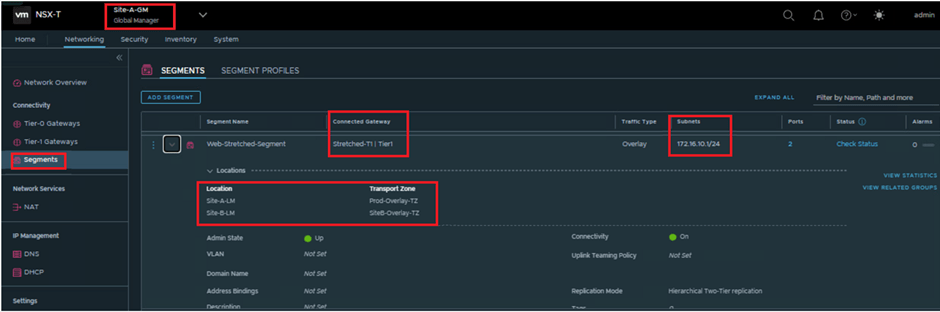
Connect required segment to Stretched T1.
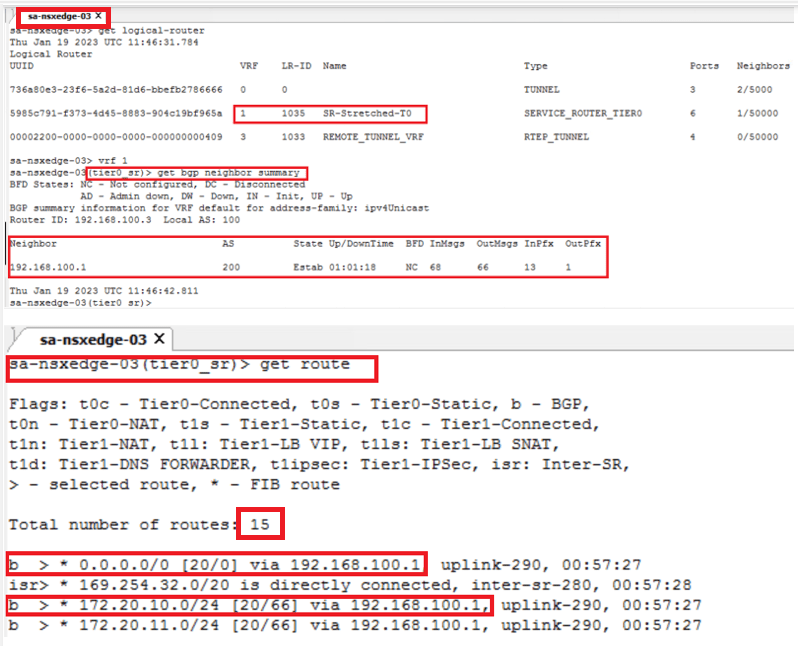
Lets check the BGP route learning from NSX edge node CLI for Site-A (sa-nsxedge-03) & Site-B (sb-nsxedge-02).
- We can see that, for Site-A / sa-nsxedge-03 – default route is being learnt via 192.168.100.1 which is nothing but its BGP peer/ TOR site interface.
- On the other hand, for Site-B / sb-nsxedge-02 – default route is not learnt via its BGP peer/ TOR site interface (BGP peering is up only) but via iSR route in between Site-A & Site-B edge node.
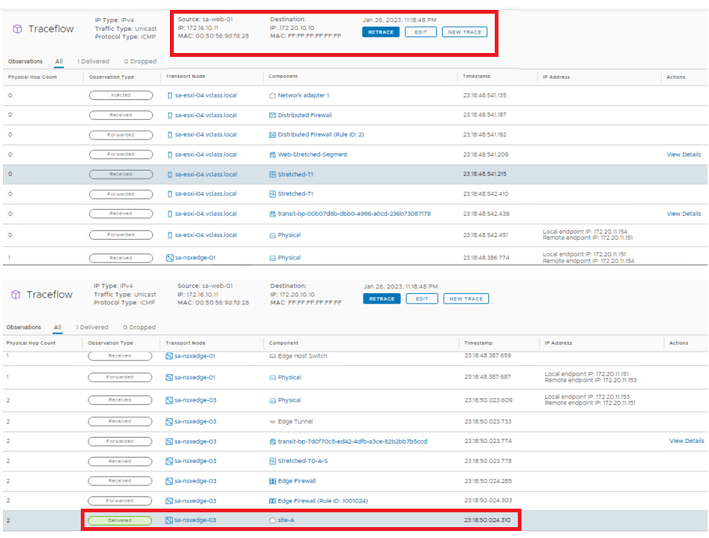
Lets validate the packet walk via Site-A LM trace-flow tool for Site-A VM (172.16.10.11) connected to stretched segment to VM (172.20.10.10) located outside DC and learnt via Site-A TOR BGP peer.
Output – We can see that packet is getting out with site-A edge node / sa-edge-03.
Site-B Validation
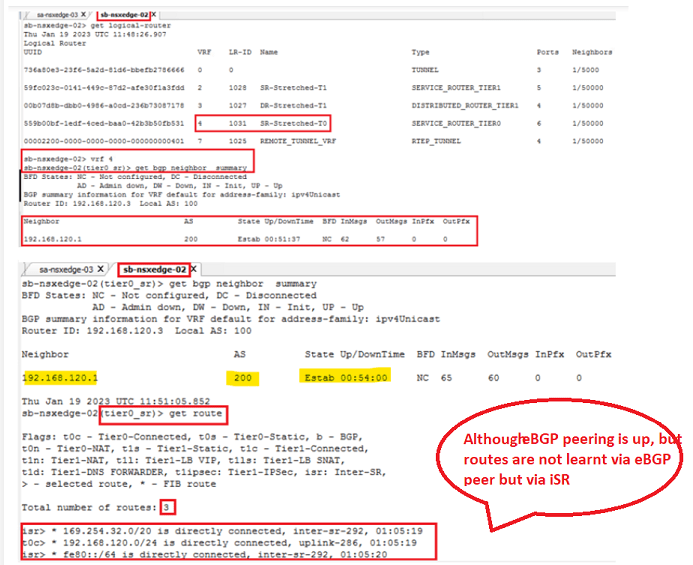
Lets validate the packet walk via Site-B LM trace-flow tool for Site-B VM (172.16.10.15) connected to stretched segment to destination VM (172.20.10.10) located outside DC.
Output – We can see that packet is getting forwarded from Site-B edge node/sb-nsxedge-02 to Site-A edge node/sa-nsxedge-03 via RTEP.

==============================================================================================================
2. T0 Active-Active | Location – Primary-Secondary – is the mode that offers the best performance without asymmetric routing challenges.

- Change from GM UI, HA mode – Active-Active , Location – Primary-Secondary
- Rest all configuration of interfaces, BGP peer, T1 and segment are same only.
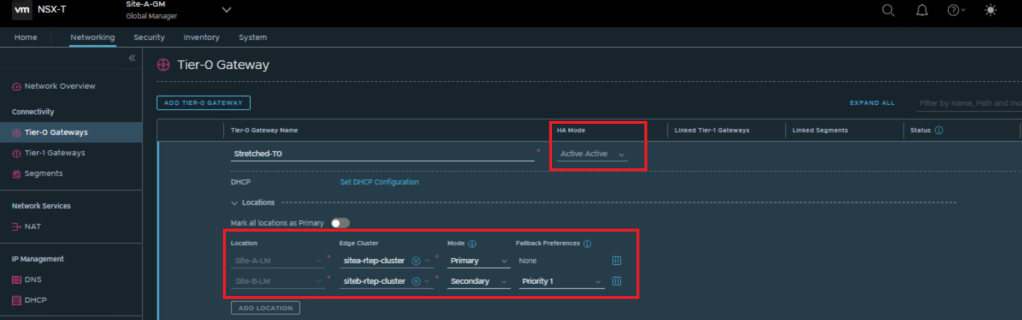
Routing for this use case is similar like A-S | Pri-Sec use-case with one major difference.
- Since T0 is Active-Active, all local edge nodes will receive Packet locally (marking 2 , as shown in above topology ) but egress will be via both Edge-nodes of primary site.
==============================================================================================================
3. T0 Active-Active | Location – All Primary – is the mode that offers the best performance but with possible asymmetric routing.
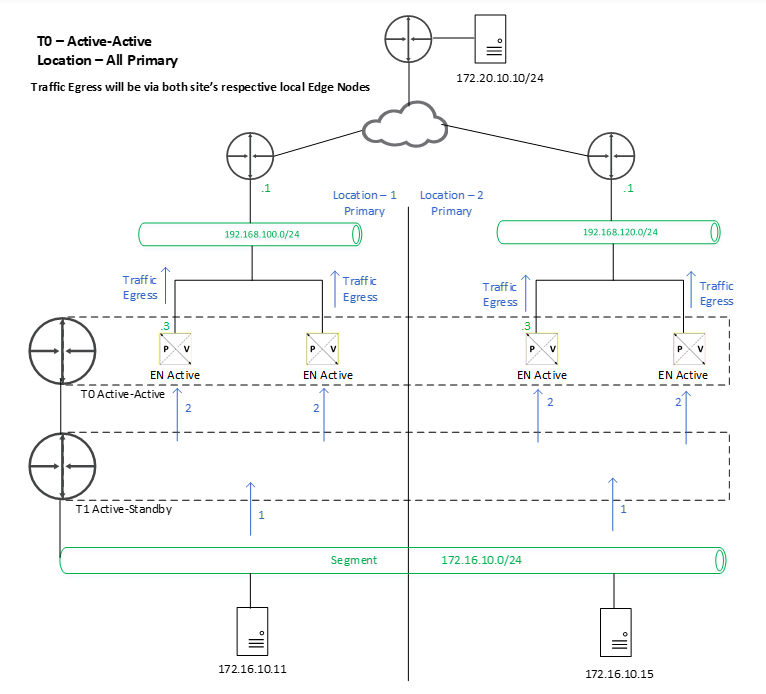
- Change from GM UI, HA mode – Active-Active , Location – Primary-Primary
- Rest all configuration of interfaces, BGP peer, T1 and segment are same only.
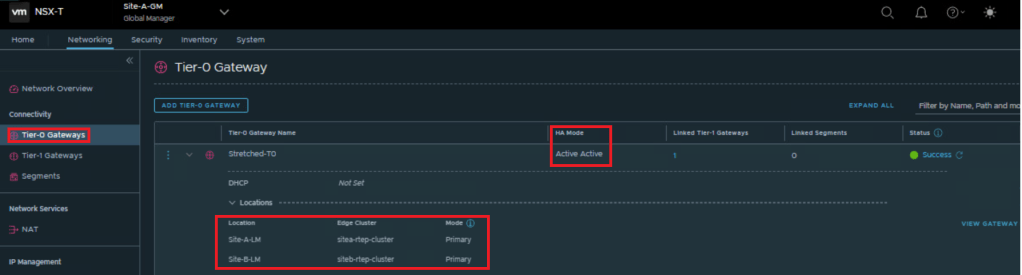
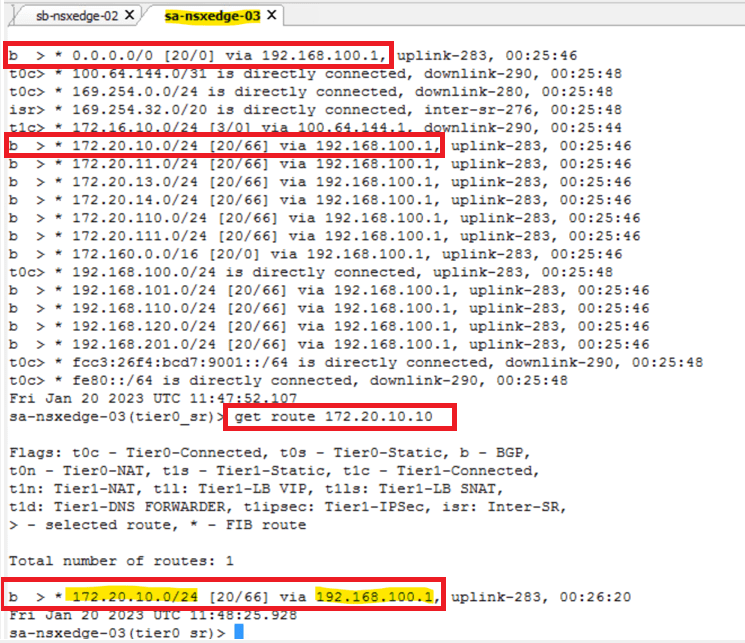
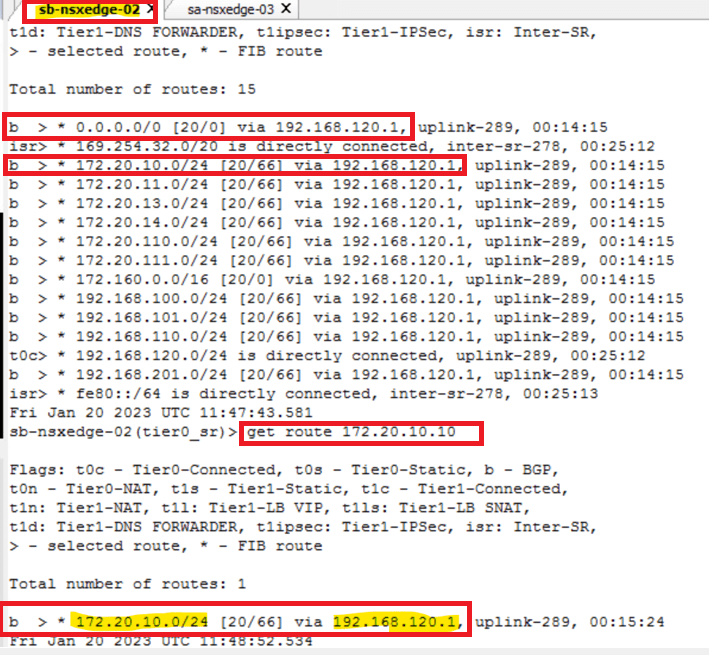
Lets check the BGP route learning from NSX edge node CLI for Site-A (sa-nsxedge-03) and Site-B (sb-nsxedge-02).
- We can see that, for Site-A / sa-nsxedge-03 – default route is being learnt via 192.168.100.1 which is nothing but Site-A BGP peer/ TOR site interface.
- Similarly, for Site-B / sb-nsxedge-02 – default route is being learnt via 192.168.120.1 which is nothing but Site-B BGP peer/ TOR site interface.
Site-A validation
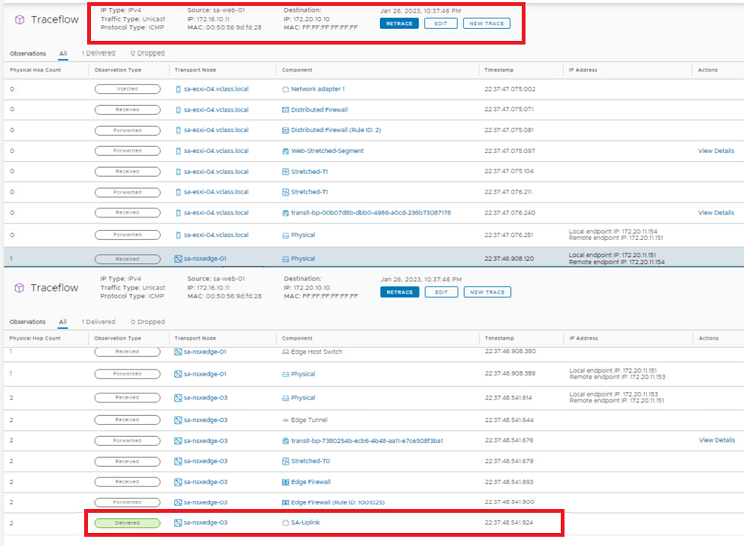
Lets validate the packet walk via Site-A LM trace-flow tool for Site-A VM (172.16.10.11) connected to stretched segment to VM (172.20.10.10) located outside DC and learnt via Site-A TOR BGP peer.
Output – We can see that packet is getting out with site-A edge node / sa-edge-03.
Site-B validation
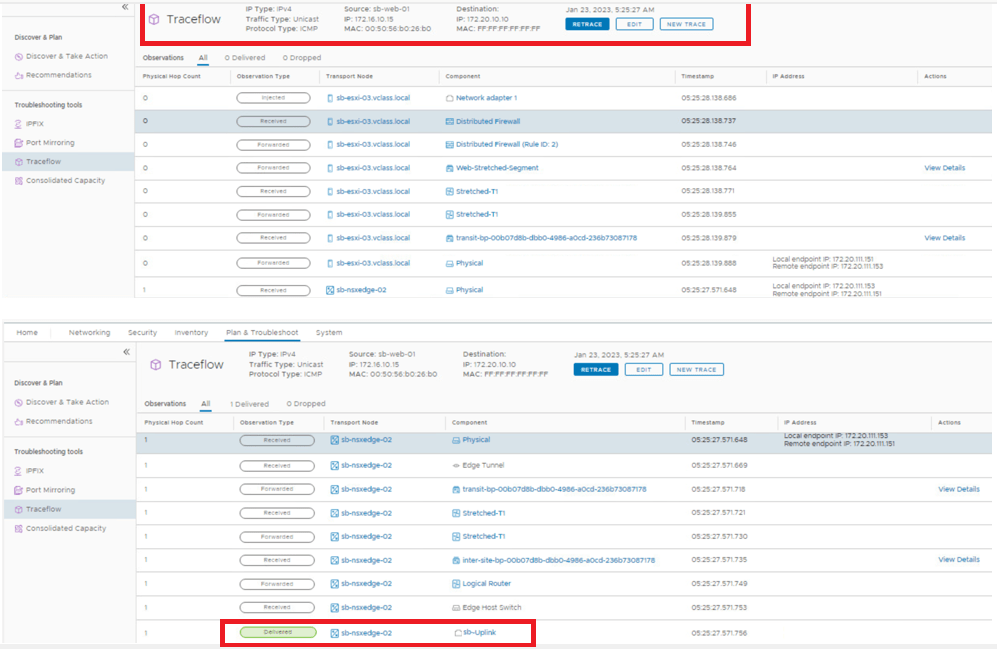
Lets validate the packet walk via Site-B LM trace-flow tool for Site-B VM (172.16.10.15) connected to stretched segment to VM (172.20.10.10) located outside DC and learnt via Site-B TOR BGP peer.
Output – We can see that packet is getting out with site-B edge node / sb-edge-02
This is it for today’s blog. We will be discussing & configuring “Global policies” in next blog, Stay tuned…
PS: Any Improvement points or suggestions are welcome.
—–Thank You—–
Prashant Pandey

 NSXworld