
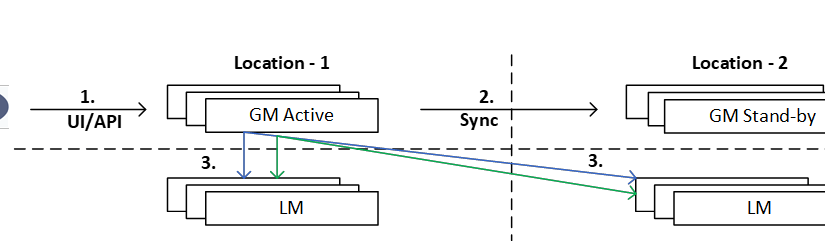
Background – We are going to discuss NSX federation (part-1) today. since federation is a lengthy topic, I have decided to keep it in a series of multiple blogs.
Where we will start from very basic of it and eventually will be discussing about different design approaches & one of the use-case which I have experienced recently.
- What is NSX Federation?
- When and Why, one should use NSX Federation?
- Key Decision Points to keep in mind before we design / deploy NSX Federation.
- Global & local objects.
What is NSX Federation?
Federation is nothing but VMware NSX feature which provides consistent networking and security policy across multiple physical sites / DCs with single UI/API plane.
As we know, we usually need multiple sites in any production environment for different reasons like:
- High availability of applications
- Better application response time
- Cost-effective hosting solution
- Provide configuration during mergers or acquisitions
With federation we can achieve above use cases with the help of stretched network components like Tier-0, Tier-1, Segments among multiple physical sites & can manage the same with single UI/API.
When and why, one should use NSX Federation?
So, with above definition we know that if we need consistent network & security services among multisite, we can leverage the use of NSX federation.
Below are few points which further supports when & why:
- Operational Simplicity: manage multiple sites with single UI/API
- Consistent Policy: With federation, Networks & Security policy can be consistent to all the sites.
- Simplified Disaster Recovery: Since our segments are stretched to multiple location & Security policies are consent, failover from one site to different site can be achieved with minimum configuration.
Key Decision Points to keep in mind before you design or deploy NSX Federation.
- NSX License requirement: Federation feature is only available with NSX Enterprise plus license and not with any lower license.
- Maximum location count: Federation supports up to eight sites from NSX 3.2 onwards. However maximum span of any stretched gateway, either Tier0 or Tier1 is up to four sites only.
- Maximum latency/Round Trip Time: From NSX-T 3.2.1, the maximum latency (RTT) between GM-Active/GM-Standby, GM/LM, and LM/LM moves up from 150 milliseconds to 500 milliseconds, However, the maximum latency between Edge Nodes to Edge Node cross location remains at 150 milliseconds
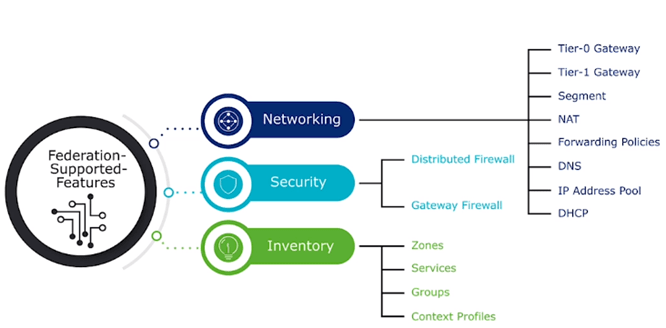
- Supported Features: Below diagram depicts the list of all supported features by Federation.
- Limitations: Below are few limitations which should be considered while opting NSX Federation. however, these features can be leveraged locally with local site configuration.

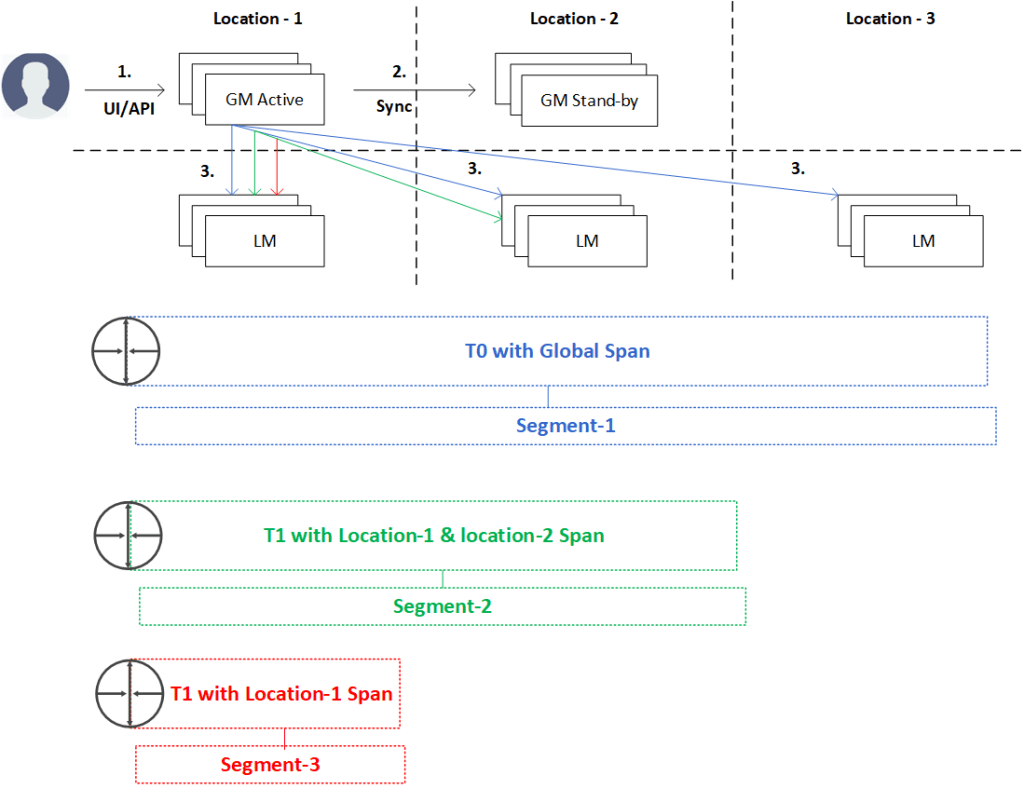
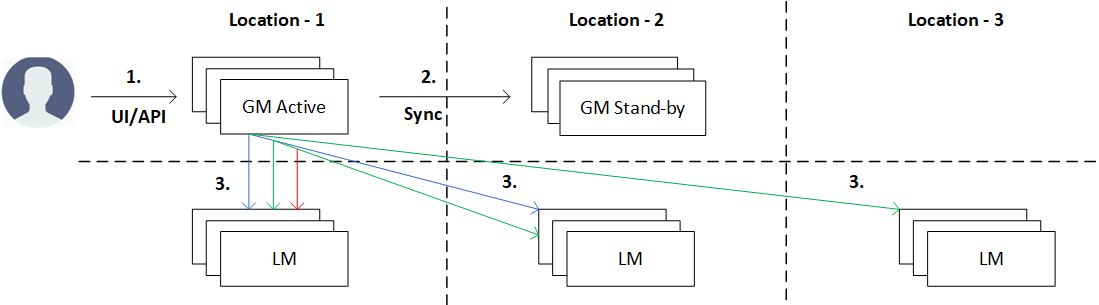
Global object – Created by GM,spans to all sites or specific LMs, if we are specifying LMs list to push the configuration from GM (will be covering this practically in forthcoming blogposts)
- NSX admin send configuration to Active GM via accessing VIP URL, can be UI or API.
- GM stores locally & replicates the config to stand by GM.
- Active GM sends it to the relevant LMs.
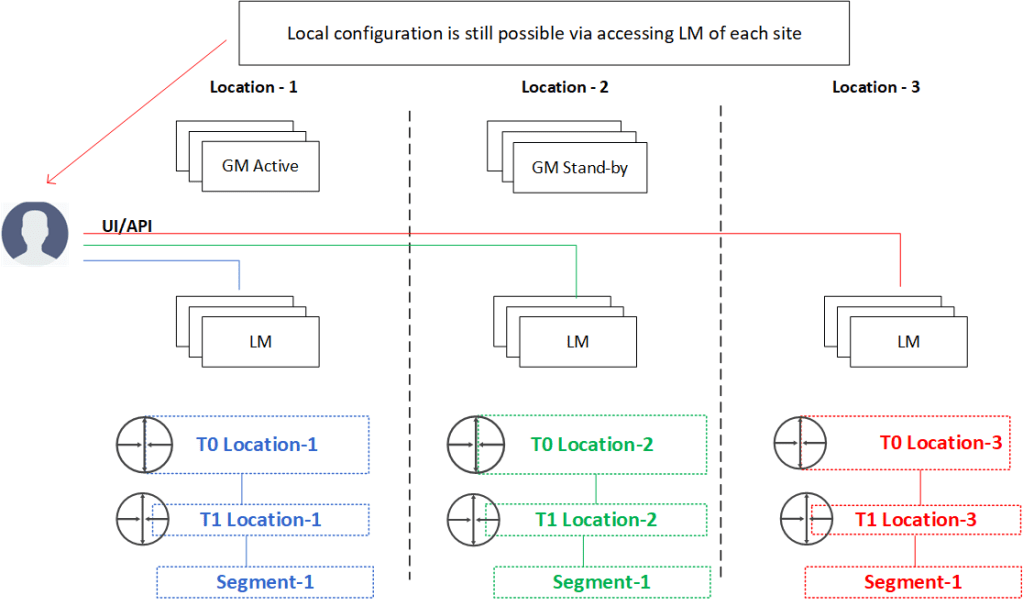
Local object – Created by LMs, spans locally to specific site/location.
Thumb rule of stretched gateway:
- Stretched Tier-0 span should be greater than equal to the span of connected Tier-1.
- Segment doesn’t have their own span, instead it inherits the span of the gateway it is connected to.
This is it for today’s blog. it was majorly theory but wanted to pass this basic yet very important information about Federation, we will be concentrating on practical part from next blogpost onwards of this series.
PS: Any Improvement points or suggestions are welcome.
—–Thank You—–
Prashant Pandey

 NSXworld
One thought on “VMware NSX Federation – Part-1”